
The website button on a Business Profile should point at the page that answers the search, which for a multi-location business means the location page, not the home page. Adding UTM parameters to that link lets you see profile traffic separately in your analytics, which is the only reliable way to tell Google Business Profile visits apart from other organic traffic. Google’s own performance data counts website clicks, but it will not tell you what those visitors did next.
The Business Profile website link on most profiles sends every visitor to the home page, where they arrive having already decided which branch they want, and are asked to choose again.
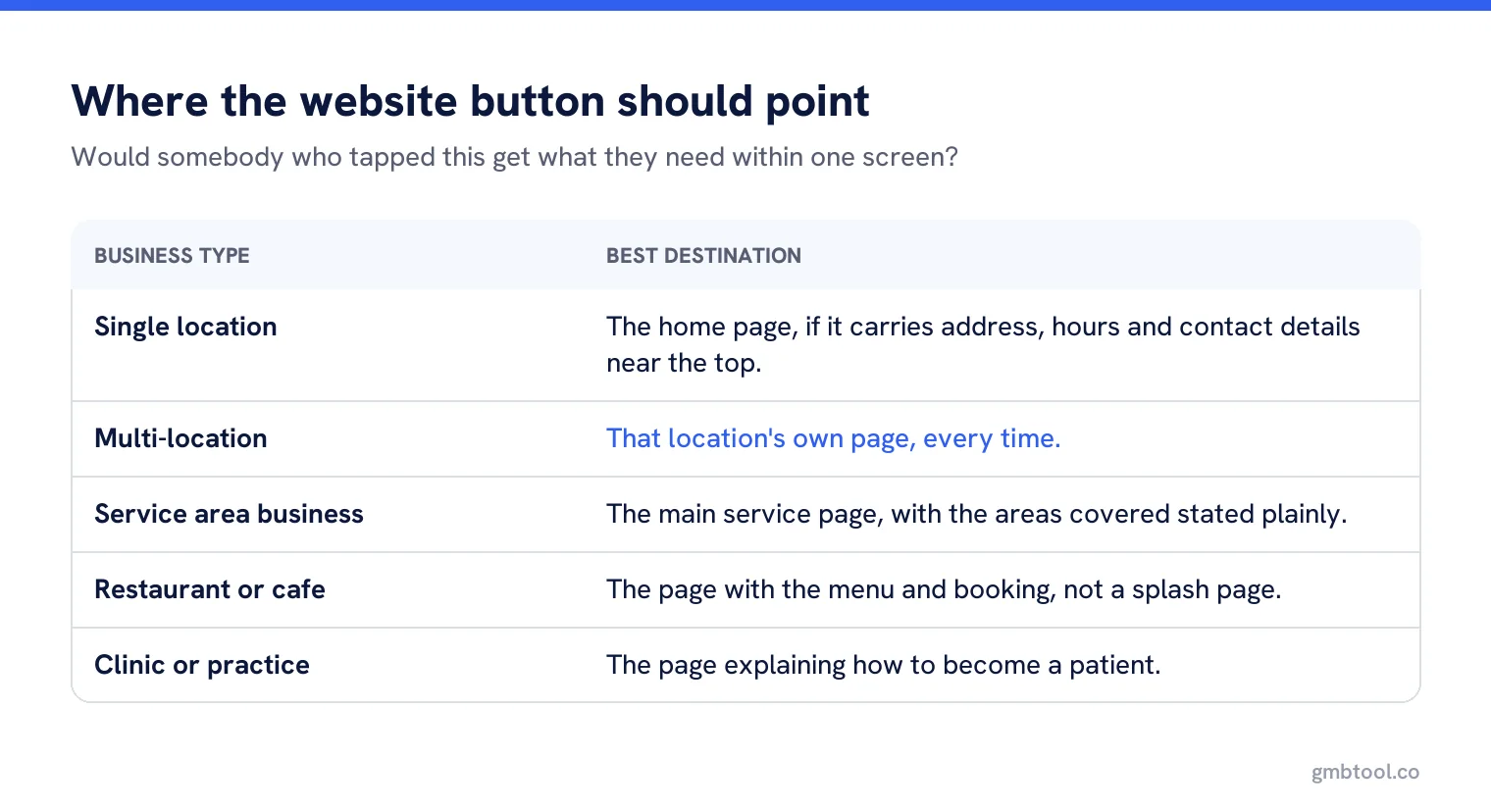
Where the link should go
| Business type | Best destination |
|---|---|
| Single location | Home page, if it carries address, hours and a way to get in touch above the fold. |
| Multi-location | That location’s own page, every time. |
| Service area business | A page for the main service, with the areas covered stated plainly. |
| Restaurant or cafe | The page with the menu and the booking option, not a splash page. |
| Clinic or practice | The page that says how to become a patient, not the About page. |
The test is simple: would somebody who tapped this button after finding you on Maps get the next thing they need within one screen? If not, change the destination before you change anything else.
Why UTM tags are worth the trouble
Without tags, traffic from a Business Profile usually lands in analytics as ordinary organic search, mixed with everything else. Tagging the link separates it, which answers questions you otherwise cannot: how many people reach the site from the profile, which locations send the most, and whether profile visitors behave differently from search visitors. They usually do, because they have already chosen you.
Google’s performance and insights data counts website clicks on the profile side, which is useful as a sanity check, but it stops at the click. Everything after that is your analytics, and only if the link is tagged.
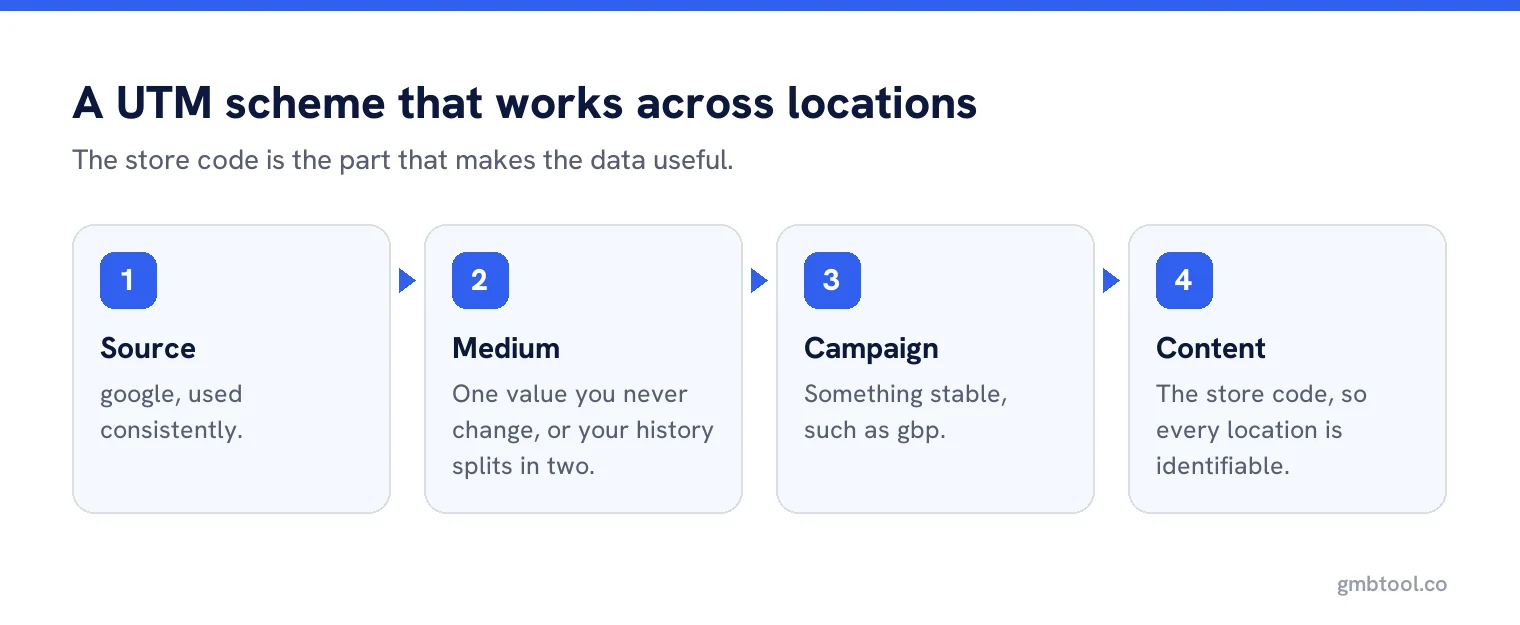
A tagging scheme that stays readable
- Source: google
- Medium: organic, or a dedicated value you use consistently for profile links
- Campaign: something stable, such as gbp
- Content or term: the store code, so every location is identifiable
The store code is the part people leave out, and it is the part that makes the data useful across an estate. Without it you know profiles sent 4,000 visits; with it you know which eleven locations sent almost none, which is a finding you can act on.
The decisions to make once, for everybody
Pick your medium value and never change it
Changing it mid-year splits your history into two incomparable halves.
Decide whether to tag the booking and menu links too
Usually yes, with a different campaign value, so you can separate them.
Write it into your location data
The tagged URL belongs in the same record as the address, generated from the store code rather than typed.
Check the destination still exists
Location pages get deleted in redesigns, and nobody checks the profile afterwards.
Things that go wrong
Tagged links that redirect strip their parameters surprisingly often, particularly when a site redirects from non-www to www, or http to https, through a stack that was never tested with query strings. Test one tagged URL end to end before rolling it out across an estate, and test it again after any website migration.
The second common failure is a link to a page that no longer exists. A redesign that moves /locations/leeds to /find-us/leeds leaves every profile pointing at a 404, and because the profile still shows a website button, nothing looks wrong until somebody checks the analytics and finds the traffic has stopped.
Other links on the profile
The website button is not the only link a profile can carry. Depending on category and region there may be appointment, menu, ordering or social links, and some of them can be added by third parties rather than by you. Audit the full set at the same time, because a link to an ordering platform you stopped using two years ago is doing active harm while the website link gets all the attention.
What not to do
Do not point the website link at a tracking domain, a shortener or anything that looks like a redirect chain. The profile should link to the business’s own site, plainly. Do not use the field for a social profile or a booking platform when you have a website; there are separate fields for social links and bookings. And do not stuff keywords into the URL path for the profile’s benefit, because the URL is not a ranking opportunity.
A worked rollout
A 26-branch veterinary group pointed every profile at the home page. The first change was mechanical: each profile now points at its own branch page, built from the store code, with tags carrying that same code. It took an afternoon using a two-column spreadsheet.
The first month of data answered a question nobody had been able to answer before. Three branches accounted for nearly half the profile traffic, and four sent almost none. Those four turned out to share a problem that had nothing to do with their profiles: their branch pages had been dropped in a website redesign two years earlier, and the profiles had been pointing at a generic page ever since.
Fixing four pages produced more measurable improvement than any amount of profile optimisation would have, and it was only visible because the links were tagged per location.
Reading the numbers afterwards
Give it a month, then compare three things: profile website clicks reported by Google, sessions arriving with your tags, and conversions from those sessions. The first two will not match exactly, and that is normal. What matters is the shape over time and the comparison between locations, not the absolute numbers.
For single-location businesses
All of this is still worth twenty minutes. One tagged link, one check that the home page answers the obvious question, and from then on your analytics can tell you how much work the profile is actually doing. That is more than most businesses know about their own Google presence.
One link per location, tagged and checked
Manage website links across every profile, with the tagging built from your store codes and broken destinations flagged.
Frequently asked questions
Should my Business Profile link to my home page?
Only for a single location whose home page already carries the address, hours and contact details. Multi-location businesses should link to that location’s own page.
Should I add UTM parameters to the profile website link?
Yes. Without them, profile traffic is mixed into ordinary organic search in your analytics, and you cannot tell which locations send visitors.
Does Google show me what profile visitors do on my site?
No. Google’s performance data counts website clicks on the profile side. Everything after the click is your own analytics, and only if the link is tagged.
Why did my UTM parameters disappear?
Redirects often strip query strings, particularly non-www to www or http to https. Test one tagged URL end to end before rolling it out.
Can I use a link shortener in the website field?
Avoid it. The field should link plainly to the business’s own site rather than through a tracking domain or redirect chain.
Sources
The Google documentation behind the guidance on this page. Google changes these pages without notice, so check the date on any figure before you rely on it.